Video (.GIF;.MP4) to Wallpaper
- 4.4
- Rating
- 1.00M
- Installs
- Free
- Price

 Analysis by App-foxy
I like personalization tools that solve one clear problem without turning the phone into a complicated project. Video (.GIF;.MP4) to Wallpaper takes that approach: it lets me turn a compatible video into a moving wallpaper, rather than asking me to settle for a still image or search through a large library of premade backgrounds. My overall view is positive, but with an important qualification: this is a focused video-wallpaper utility, not a complete wallpaper platform. If your goal is to put a favorite clip on your home screen, it is easy to understand. If you want deep visual customization, battery controls, or a large catalog of ready-made designs, another type of app may suit you better.
What the app does well in everyday use
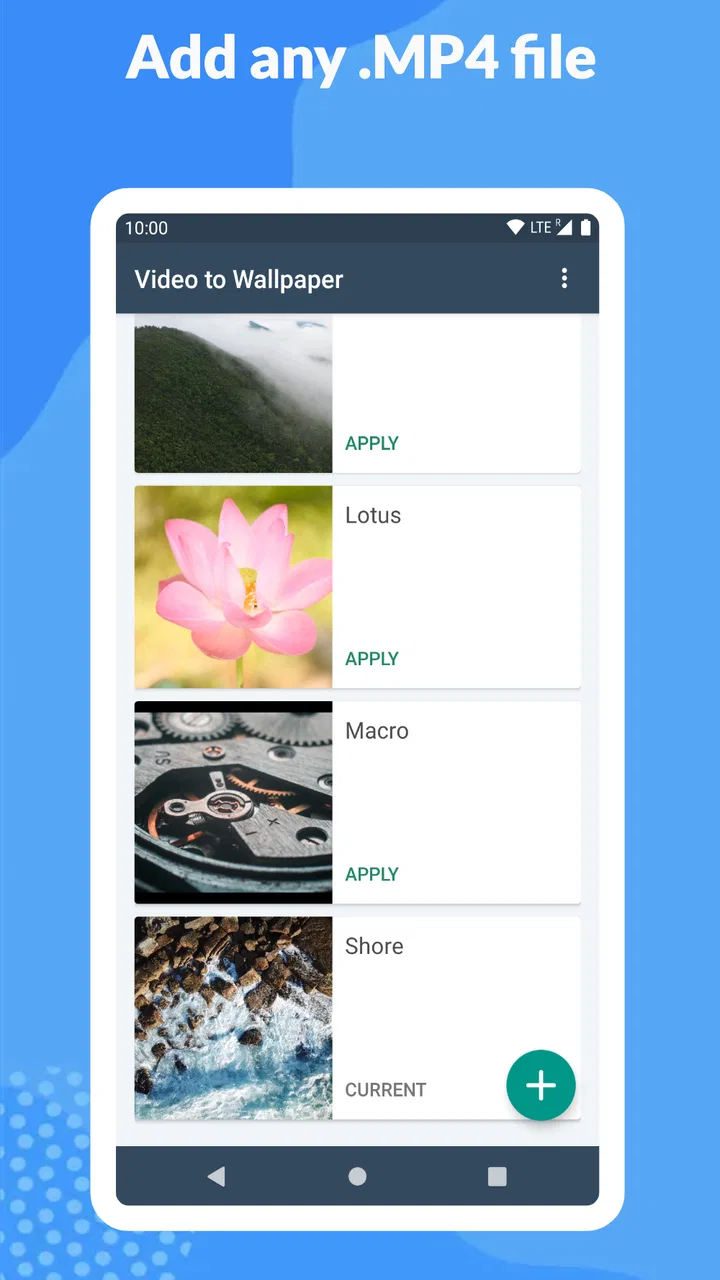
The main appeal is immediate. I can start with a GIF, MP4, or MOV file and use it as a live wallpaper instead of converting it manually through a separate editor. That makes the app useful for personal clips, animated artwork, short travel scenes, abstract loops, or a small moment I want to see whenever I return to the phone. The process feels more direct than downloading an animated wallpaper from an unrelated source and hoping it matches the screen properly.
Its place in the personalization category is therefore quite specific. It does not try to replace a launcher, icon pack, lock-screen editor, or full wallpaper marketplace. It focuses on the video itself. I appreciate that narrow purpose because it keeps the decision simple: choose a supported file, prepare it for wallpaper use, and apply it through the phone’s wallpaper system.
You May Also Like

 Blood Strike: 2.5 Anniversary
Blood Strike’s Loadouts Turn Every Drop Into a Tactical Gamble
A close look at Blood Strike’s custom loadouts: how fast access to signature weapons reshapes its battle royale rhythm, rewards preparation, and narrows the gap between fights.

 Pandora - Music & Podcasts
Pandora’s Music Is Easy to Start, but Harder to Recover
Pandora’s strength is its low-effort path from a seed to a station. Its weak spot is how much confidence it asks you to place in connection, setup, and quiet recovery.

 8 Ball Pool
 Is Built on Rivalries, Rematches, and Routine
A close look at the rivalries, rematches, shared routines, and unanswered safety questions that turn a quick pool match into a persistent mobile community.

 Samsung Music
’s Quiet Strength Is Playing What You Already Own
Its reach comes less from spectacle than from dependable access to a personal library. That simplicity is both the app’s strongest retention engine and its ceiling.

 AccuWeather: Weather Radar
AccuWeather Review: A Quick, Clear Forecast for Everyday Decisions
For everyday plans, the best forecast is the one you can understand quickly. AccuWeather makes rain timing, radar, and local conditions easy to act on, with a few trade-offs.

 Hill Climb Racing
Why Hill Climb Racing Still Turns Crashes Into One More Run
A tiny car, a bumpy hill and one more upgrade: Hill Climb Racing keeps resurfacing because its simple chaos makes every near-miss feel personal.
More From Our News Desk



The developer, Audrius Koncius, has kept the product approachable enough for ordinary users. The app is free to install, with optional in-app purchases priced at $0.99 per item. That makes it easy to test with a clip before deciding whether the extra purchase options are worthwhile. It is also marked for Everyone, which fits the straightforward nature of the tool.
Compatibility is another practical advantage. The minimum requirement is Android 7.0, so the app is not restricted to only recent phones. The current version is 1.1.12, and the project has been available since May 13, 2020. Those details matter less than the actual workflow, but they help explain why the app can appeal to people using a broad range of Android devices rather than only the newest models.
Why choosing your own video matters
Premade wallpaper apps are convenient, but they usually make me browse someone else’s collection. With this tool, the visual choice starts with my own files. That is a meaningful difference for anyone who wants a family clip, a personal animation, a favorite game scene, or a deliberately minimal loop instead of a generic wallpaper.
I also find the format support useful because people do not keep every animated file in the same form. A short GIF may come from a messaging conversation, an MP4 may come from the camera, and a MOV may come from another device or editing workflow. Being able to work with those common video types reduces the need to convert everything before beginning.
A good practical habit is to select a clip that already works as a loop. A video with a clean beginning and ending will feel much more polished than a long recording that suddenly cuts back to its first frame. This is one of the most important creative decisions, and it happens before the app can improve the result. I would trim or prepare the source elsewhere when necessary, then use this app for the wallpaper step.
A realistic phone scenario
Imagine I record a short clip of rain on a window and want a calm home screen after work. I would choose that video rather than a busy montage, check that the important detail sits near the center, and apply it as the wallpaper. The result is personal without requiring a full design project. The same workflow works for a slow cloud movement, a looping illustration, or a short clip of a pet, provided the source looks good when repeatedly viewed.
For a work phone, I might choose something more restrained: a dark abstract animation with no distracting faces or text. For a child’s device, I could use a colorful personal clip while remembering that movement can be visually busy. The app gives me the conversion path, but the quality of the experience depends heavily on the clip I bring into it.
Useful choices before applying a video
The best results come from treating the source file as wallpaper material rather than ordinary video. A portrait-oriented clip is usually easier to place on a phone screen than a wide landscape recording. If the subject is close to an edge, cropping can remove it or make the composition feel unbalanced. I would preview the file on the phone and pay attention to where icons will sit, because a beautiful scene can become difficult to read once the home-screen layout is added.
Shorter clips are also more practical than lengthy recordings. A wallpaper is something I see repeatedly, so a compact visual idea tends to age better than a full video with a beginning, middle, and end. A seamless loop is especially valuable: when the transition is subtle, I stop noticing the restart and the wallpaper feels intentional.
Another useful tip is to keep a still alternative ready. A moving background can be enjoyable at first but may become distracting during everyday navigation. If I know I will be reading, typing, or checking information frequently, a static image may be more comfortable. This app is best when I want motion as an accent, not when I expect the background to remain invisible.
Where it compares favorably with usual alternatives
Compared with a normal static wallpaper picker, this app offers a personal sense of motion without requiring a separate live-wallpaper catalog. Compared with wallpaper marketplaces, it gives me control over the source material and avoids making the available designs the center of the experience. Compared with a general video editor, it is more relevant to the final phone-wallpaper task and does not force me to learn a complete editing suite just to use a clip.
That comparison also reveals its limits. A wallpaper marketplace may be better if I want instant access to professionally designed loops. A video editor may be better if I need precise trimming, text, color adjustments, or sophisticated transitions before setting the result. A phone’s built-in wallpaper tools may be enough if the device already supports video backgrounds in the way I want. I would choose this app when the missing link is specifically “use my own video as the wallpaper.”
The friction I noticed and who should think twice
The biggest weakness is that the app cannot make a poor source video look like a polished wallpaper. A clip recorded in landscape orientation may crop awkwardly. A file with a distracting first frame may produce an obvious loop. A video with important details at the top or bottom can also compete with status icons and app labels. These are not small design issues; they determine whether the final result feels pleasant or annoying.
There is also a trade-off between motion and everyday usability. Animated backgrounds can draw attention away from icons, make a simple home screen feel busier, and become tiring when the effect is too strong. I would avoid rapidly flashing clips, high-contrast animations, or anything that makes text difficult to read. The most successful wallpapers I have used are usually slow, quiet, and visually simple.
Battery and performance are worth considering as well. Any moving wallpaper has more work to do than a still image, even though the exact effect will depend on the phone, the file, and how the system handles live wallpapers. On an older device, I would test the result for a while rather than assuming the experience will be identical to a newer phone. If battery life is a top priority, a static wallpaper remains the safer choice.
File preparation can become another point of friction. The app supports GIF, MP4, and MOV, but that does not mean every file in those formats will look equally good. Resolution, orientation, duration, and compression all affect the final appearance. A large or unusually encoded video may be less convenient than a modest, phone-friendly clip. I would keep an original copy of anything important and use a duplicate when experimenting.
Users who expect extensive controls should set their expectations carefully. This is not the tool I would recommend for building a full visual theme, managing several elaborate scenes, or editing videos from start to finish. Its strength is the handoff from personal video to wallpaper. Once that task is complete, the rest of the result depends on Android’s wallpaper behavior and the quality of the source.
Who will get the most from it
I think it is a strong fit for people who already have a specific clip in mind. That includes anyone who wants a personal memory on the home screen, creators who want to display a short animation, and users who find standard wallpaper collections too impersonal. It is also useful for someone who wants to experiment with motion without committing to a large customization suite.
The app is less suitable for someone who wants a one-tap library of attractive backgrounds. If I had no video prepared and simply wanted to browse polished designs, I would start with a dedicated wallpaper service instead. I would also skip this option if I strongly prefer a distraction-free interface, have strict battery concerns, or need advanced editing controls inside the same application.
Its broad Android support makes it approachable for owners of older compatible phones, while the free entry point lowers the risk of trying it. The store presence is substantial, with over one million installs, an average rating of 4.4, and around thirteen thousand ratings. I see that as evidence that the basic idea resonates with many users, though it does not remove the need to judge the app against my own phone and video files.
How I would use it without wasting time
First, I would choose a clip that is short, visually calm, and already close to the phone’s portrait shape. Second, I would watch it several times from beginning to end to see whether the restart is distracting. Third, I would check the composition behind icons and widgets rather than judging the video only in a gallery. Finally, I would use the wallpaper for a normal day before deciding that it is a permanent choice.
I would also avoid using a valuable original file as the first test. A duplicate makes it easier to resize or prepare the clip elsewhere if the first attempt does not fit. If the file contains private footage, I would think about whether I am comfortable using it as a visible phone background, especially when the device may be seen by other people. Personalization is most enjoyable when it does not create a privacy or practicality problem.
My final recommendation
After using it as a focused personalization tool, I see Video (.GIF;.MP4) to Wallpaper as a sensible choice for Android users who want to turn their own animated files into live backgrounds. It succeeds because the purpose is clear, the supported formats cover common video habits, and the free installation lets me try the workflow before spending anything on optional items.
My recommendation comes with a simple condition: bring it a good source video. The app is not a replacement for editing software, a curated wallpaper library, or the calm reliability of a static image. It is the bridge between a clip I already like and a moving phone background I can see every day.
For that audience, I would recommend giving it a try. Start with a quiet, well-framed loop rather than the longest or most dramatic video in the gallery. If the result remains readable, comfortable, and visually pleasant after ordinary phone use, this app does exactly the job I wanted. If it becomes distracting or the crop feels wrong, the better decision is not necessarily to abandon personalization; it may simply be to choose a better-prepared clip or return to a static wallpaper.
FAQs for Video (.GIF;.MP4) to Wallpaper
01What is Video (.GIF;.MP4) to Wallpaper used for?
Video (.GIF;.MP4) to Wallpaper is designed to turn animated GIF files or MP4 videos into live wallpapers for your device. After selecting a compatible file, you can usually preview how it will appear on the home screen and apply it as a moving background. It is useful for personalizing your phone with short clips, animations, or memorable moments instead of using a static image.
02Can I use my own GIFs and MP4 videos as wallpapers?
Yes, the app is primarily intended for using personal media files stored on your device. You can select a GIF or MP4 video from your gallery or file manager, depending on the permissions and file access options available on your phone. For the best results, choose a short, vertically oriented video with suitable resolution, since large or wide files may be cropped or may consume more storage and battery.
03Will the live wallpaper work on every Android or iOS device?
Compatibility depends on the operating system and the device’s support for live wallpapers. Android phones generally offer broader support through the live wallpaper system, although menus and available options can vary between manufacturers. iOS has more restrictions and may not support continuously playing video wallpapers in the same way. Check the app’s store listing and your device settings before downloading.
04Does using a video wallpaper drain battery or affect performance?
A moving wallpaper can use more battery and system resources than a regular still image, especially when the video is long, high-resolution, or constantly animated. On newer devices, the impact may be modest, but older phones can experience additional battery consumption or occasional delays. Using short clips, reducing video resolution, and disabling sound can help provide a smoother and more efficient experience.
05Does the app keep the sound from my GIF or MP4 video?
Live wallpapers are normally displayed without audio, because continuously playing sound on the home screen would be disruptive and could quickly consume battery. The selected MP4 may therefore be muted when it is converted into wallpaper. The exact behavior depends on the app version and device system, so users who need audio should keep the original video separately rather than expecting the wallpaper to play its soundtrack.
Pros
- Supports both GIF and MP4 files for flexible wallpaper creation.
- Lets you use personal videos instead of relying only on preset backgrounds.
- Can add a more dynamic look to an otherwise static home or lock screen.
- Useful for turning short clips
- animations
- or memorable moments into wallpapers.
- Simple concept that is easy to understand for first-time users.
Cons
- Animated wallpapers may consume more battery than static images.
- Large or high-resolution videos can take up considerable storage space.
- Some devices may limit live wallpaper support on the lock screen.
- Video playback quality can vary depending on device performance.
- The app may require extra permissions to access media files on your device.

Video (.GIF;.MP4) to Wallpaper
Gallery